Empower your AI migrations to Quarkus with Skills

What are Skills?
Skills are an open standard for packaging reusable instructions that teach AI coding agents how to perform specialized tasks. A Skill is simply a directory containing a SKILL.md file — a Markdown document with YAML header describing what it does and when to trigger it, followed by step-by-step instructions the agent must follow.
Skills follow a progressive disclosure model that optimizes context window usage across all installed skills: agents load only the metadata at startup, pull in the full instructions when the skill triggers, and fetch reference files on AI’s demand. This keeps context usage efficient while giving the agent deep domain knowledge exactly when it needs it.
The Quarkus project maintains its own collection of Skills in the quarkusio/skills repository. These Skills transform a general-purpose coding agent into a Quarkus expert, capable of creating projects, upgrading versions, and — as we will explore in this post — migrating entire Spring Boot applications to Quarkus.
Why use AI Skills for migration?
Migrating an application from one framework to another is a task that is complex and require deep knowledge about the technology used. Consider a Spring Boot to Quarkus migration: you need to rewrite the maven or Gradle build file, swap annotations (@Autowired to @Inject, @RestController to JAX-RS resources), convert configuration properties, refactor the Web layer to move to Qute, and more. Each of these steps follows well-known mapping rules, but the sheer number of files and the subtle interactions between them make manual migration tedious and error-prone.
This is where AI agents shine — they can apply transformation rules across an entire codebase methodically. But a generic agent lacks the framework-specific knowledge to make the right choices. It might produce code that compiles but does not follow Quarkus development best practices, or it might miss a critical dependency swap.
Skills bridge that gap. By giving the agent a curated set of instructions, reference mappings, and gate checks, you get the best of both worlds: the tireless execution of an AI agent guided by the deep domain expertise encoded in the Skill. The result is a migration that is fast, consistent, and with few errors.
How we designed the migration Skill
The migrate-spring-to-quarkus Skill uses a: - Modular, domain-based approach with Gate checks - Critical rules: "Never delete code you cannot migrate", "don’t break the build", "Document every decision", "No silent changes" aiming to safely migrate an application and to document the decisions made.
| Such rules enforce how the migration process will take place and better express the needs than a generic prompt. |
Rather than one monolithic script, the migration is broken into independent modules, each responsible for a specific technical domain:
| Module | Responsibility |
|---|---|
|
Enforce JDK 21+ compatibility |
|
Migrate |
|
Convert Spring annotations to their CDI/JAX-RS/Quarkus equivalents ( |
|
Migrate Thymeleaf or JSP views to Quarkus-compatible alternatives and update static resource paths |
|
Convert |
|
Remove leftover Spring artifacts, unused imports, and stale configuration |
Each module follows the same disciplined cycle: Evaluate gate → Load reference files → Execute transformations → Compile → Verify. A module only runs if its gate condition is met.
For example, the frontend module is skipped entirely if the project has no Thymeleaf or JSP templates. If compilation fails after a module completes, the agent stops immediately — no cascading errors.
Different reference files help the AI model to better understand the transformations to apply:
-
dependency-map.md— maps Spring Boot starters to their Quarkus extension equivalents -
annotation-map.md— maps Spring annotations to JAX-RS, CDI, and Quarkus annotations -
config-map.md— mapsapplication.properties/application.ymlkeys between frameworks
This design ensures that the migration is transparent (every decision is documented), safe (the build is verified after each phase), and extensible (you can add new modules or override reference mappings for your specific project).
How to run a Spring-to-Quarkus migration
Step 1: Install the Skill
We use Claude Code as our agent in this walkthrough, but you can use any agent that supports Skills (IBM Bob, Claude Code, Cursor, Windsurf, OpenCode and many others).
Install the migration Skill using npx skills:
npx skills add quarkusio/skills --skill migrate-spring-to-quarkusThis downloads the Skill files into your project’s .claude/skills/ directory (for Claude Code). To install it globally so it is available across all your projects, add the -g flag:
npx skills add quarkusio/skills --skill migrate-spring-to-quarkus -g
You can also install all available Quarkus Skills at once with the command: npx skills add quarkusio/skills.
|
Step 2: Start the migration
Open a terminal and navigate to your Spring Boot project (Petclinic, TODO, etc) to be migrated and launch your agent.
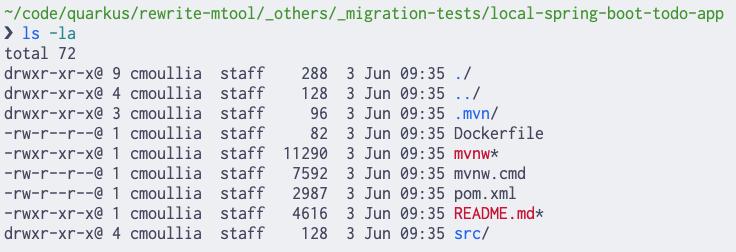
| Don’t forget to configure the agent authentication mode using the API Key and/or subscription according to the provider before to launch it ! |
Then ask the agent to start the migration using the following tailored prompt.
The prompt message already provide to AI important information like:
-
The text to be used to trigger the appropriate skill: "Migrate this Spring Boot project to Quarkus"
-
The migration strategy to be used. See hereafter the section covering that part
-
Migration and build instructions
-
The summary report to be generated
claude "Migrate this Spring Boot project to Quarkus using the full migration strategy."|
The migrate-spring-to-quarkus skill supports 2 migration strategies: full - Quarkus native or Spring Compatibility. The The agent selects the correct installed skill by matching the phrase 'Migrate this Spring Boot' from the user’s prompt with the skill’s description. |

Step 3: Analysis and strategy selection
The agent first scans the application using different tools executed locally and presents to the user a summary. Depending on which agent you use, the tools executed and the mode (code, ask, etc), the result will be different but nevertheless you should be able to see most of the information around a Java application as: JDK, Build tool, version, modules, etc.
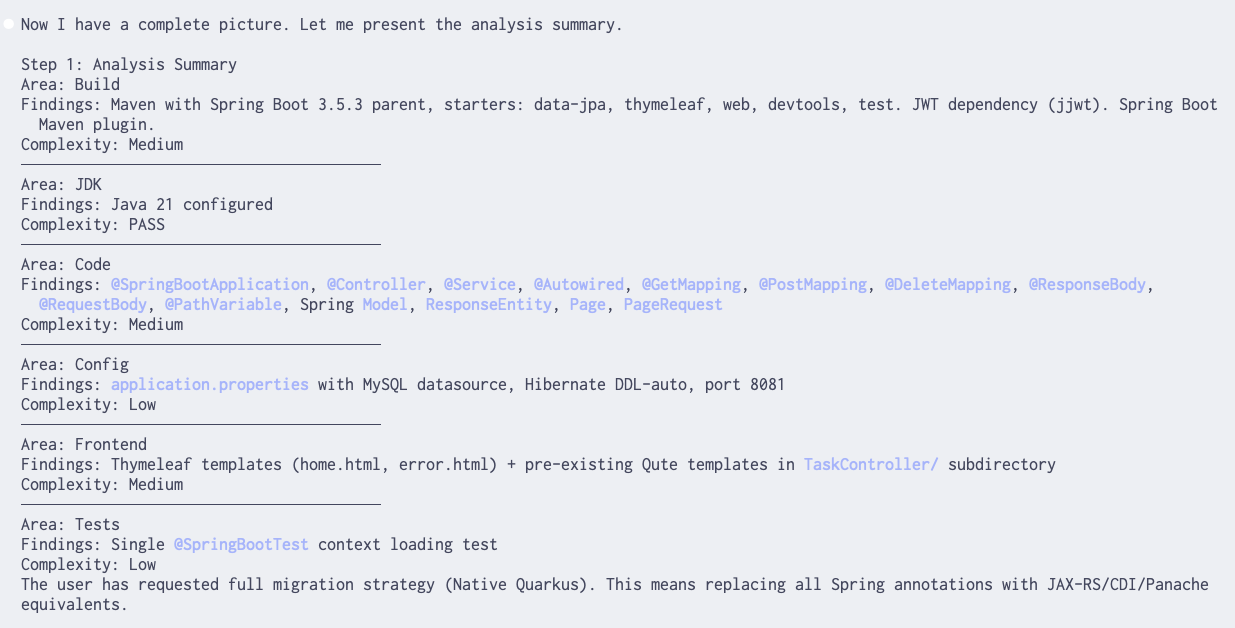
| The summary includes the strategy defined part of the user’s prompt to be executed. |
If your application is a git managed project, then AI will execute the instructions of this section and will propose to create a new branch named according to the convention: migration/run-01, migration/run-02, …, created from main.
This branch will include, at the end of the migration process, a single commit with all changes plus the migration report (see step 6). A draft PR will be created for review from this branch. It is not merged and will serve as a permanent diff and discussion record.
Step 4: Module selection and execution
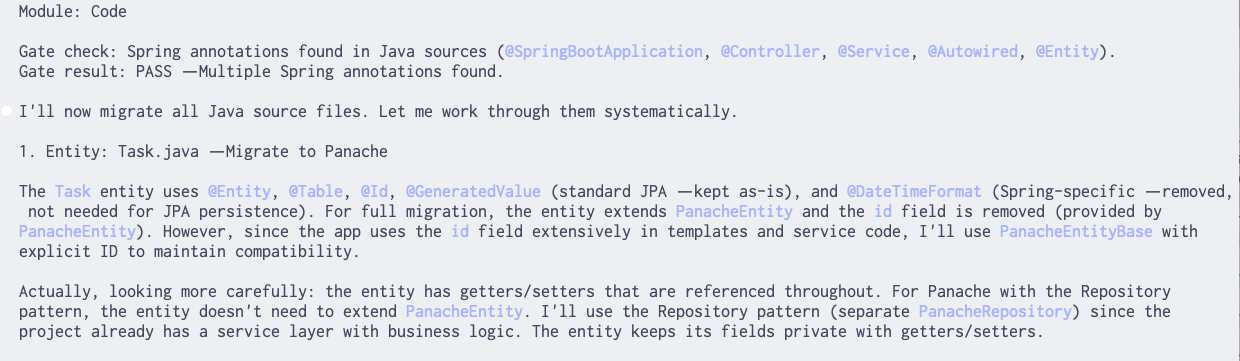
As preamble to execute the set of the instructions, AI will report that it will now read the different "references" files and load the modules to get the instructions:

As mentioned at the beginning of the blog, the module’s instructions will be selected only if the condition declared part of the GATE CHECK is passing.
| By looking to the "Gate result", you can immediately see which module has been selected and is currently processed |
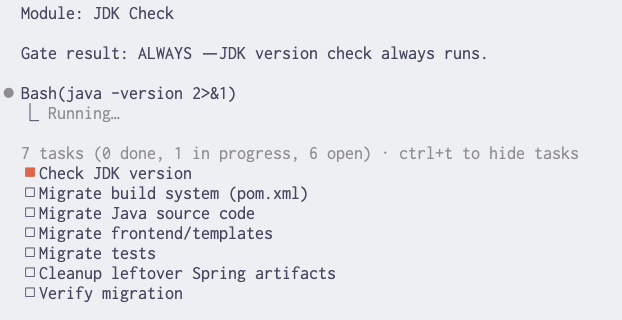
The agent populates a list of "check boxes" corresponding to the list of the modules and will change the symbols during the migration process.
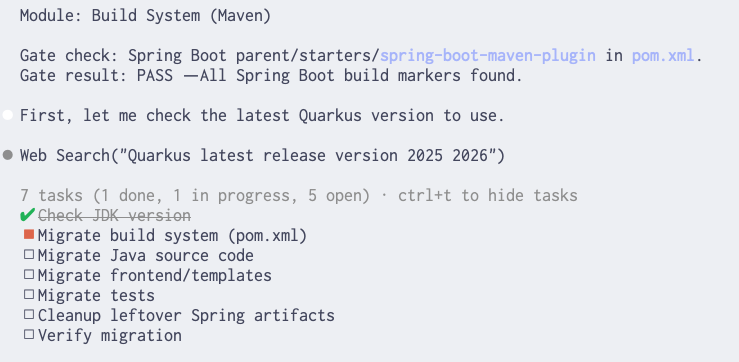
Here are some example messages produced during the execution of the "Code" module when Spring annotations were detected in Java source files.
| The messages will depend on the selected model and tokens window size ! |
| The "frontend" module is optional if the application to be migrated doesn’t include, thymeleaf files, jsp and/or JavaScript assets |
| if the compilation fails after a module, the agent pauses but will try to fix the issue, and only moves to the next module when the build is green again." |
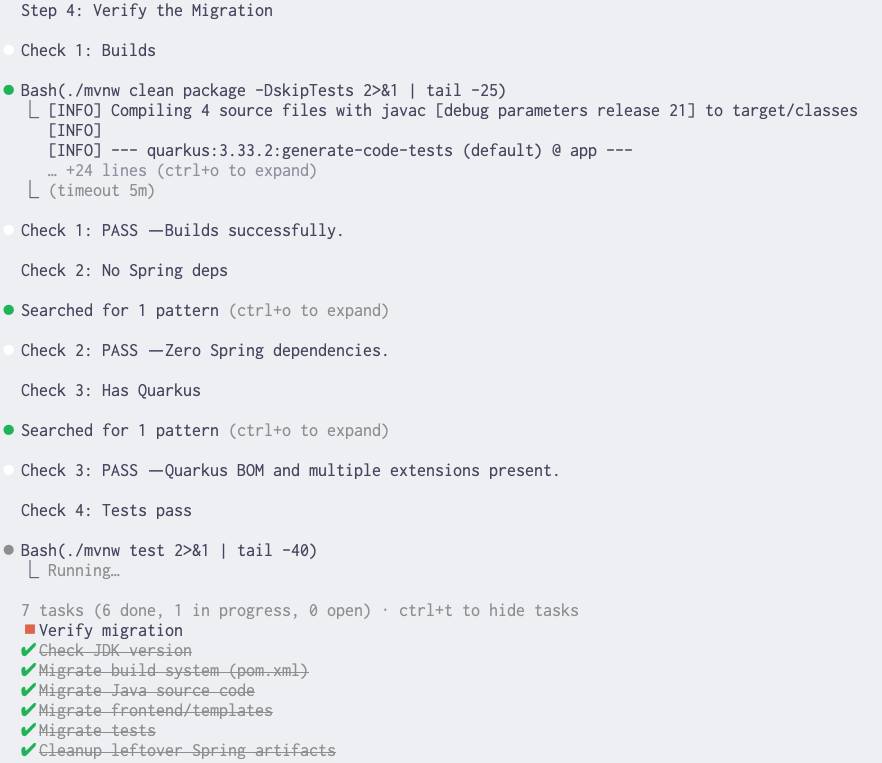
Step 5: Verification
After all modules complete, the agent runs the verification instructions.
The checks we are doing allow to verify if the application has been migrated, that we have a Quarkus application and that the application can be launched using: mvn quarkus:dev.
Step 6: Migration report
The summary report that we request to be created is defined part of the following skill’s section and will provide you with important information:
-
Strategy used
-
Agent and model used
-
Score about the migration:
-
Modules completed
-
Checks passed
-
Token usage and estimated costs (optional and depend on the agent used)
Next, the report will detail:
-
Changes by Module
-
Validation Results
-
Unmigrated Code (TODOs)
-
Removed code
-
Skill Improvement Suggestions
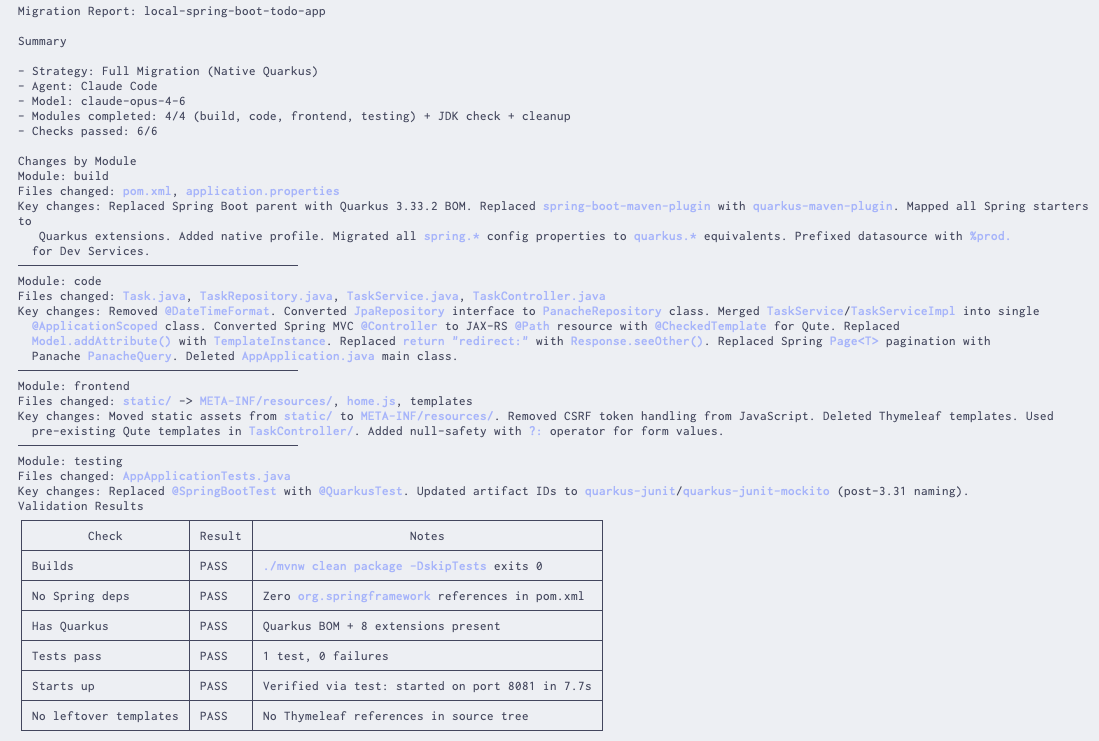
| Don’t hesitate to compare different models, to change the strategy and use such a report to validate your migration path ! |
Nest step: Launch your Quarkus application
Your migrated application is now a Quarkus project. Start it in dev mode:
mvn compile quarkus:devYou should see the familiar Quarkus banner and your application running with live reload enabled:
 --/ __ \/ / / / _ | / _ \/ //_/ / / / __/
 -/ /_/ / /_/ / __ |/ , _/ ,< / /_/ /\ \
--\___\_\____/_/ |_/_/|_/_/|_|\____/___/
2026-06-03 11:30:03,129 INFO  [io.quarkus] (Quarkus Main Thread) app 0.0.1-SNAPSHOT on JVM (powered by Quarkus 3.33.2) started in 9.058s. Listening on: http://localhost:8081

2026-06-03 11:30:03,130 INFO  [io.quarkus] (Quarkus Main Thread) Profile dev activated. Live Coding activated.
2026-06-03 11:30:03,131 INFO  [io.quarkus] (Quarkus Main Thread) Installed features: [agroal, cdi, compose, hibernate-orm, hibernate-orm-panache, jdbc-mysql, narayana-jta, qute, rest, rest-jackson, rest-qute, smallrye-context-propagation, vertx]
Conclusion
Skills turn your AI coding agent into a Java domain expert able to migrate Spring applications to Quarkus. Instead of relying on the general knowledge baked into a large language model (llm), using skills with reference files allows to give precise and curated instructions making the migration process straightforward even for more complex domains involving web parts.
For Spring-to-Quarkus migrations, this means every annotation swap, every dependency change, and every configuration mapping follows a verified playbook — with gate checks ensuring the build stays green at every step.
The modular, domain-based design also means you are not locked into a one-size-fits-all approach. You can customize reference mappings, add project-specific modules, or even write entirely new Skills for other migration scenarios.
We encourage you to try it on your own Spring Boot projects and share your feedback with the community.
Resources
-
Quarkus Skills repository — the collection of Skills maintained by the Quarkus project
-
Agent Skills specification — the open standard defining the Skills format
-
npx skills CLI — the CLI tool for discovering and installing Skills
-
Claude Code — the AI agent used in this walkthrough
-
IBM Bob — the AI SDLC partner for working with real codebases.

